
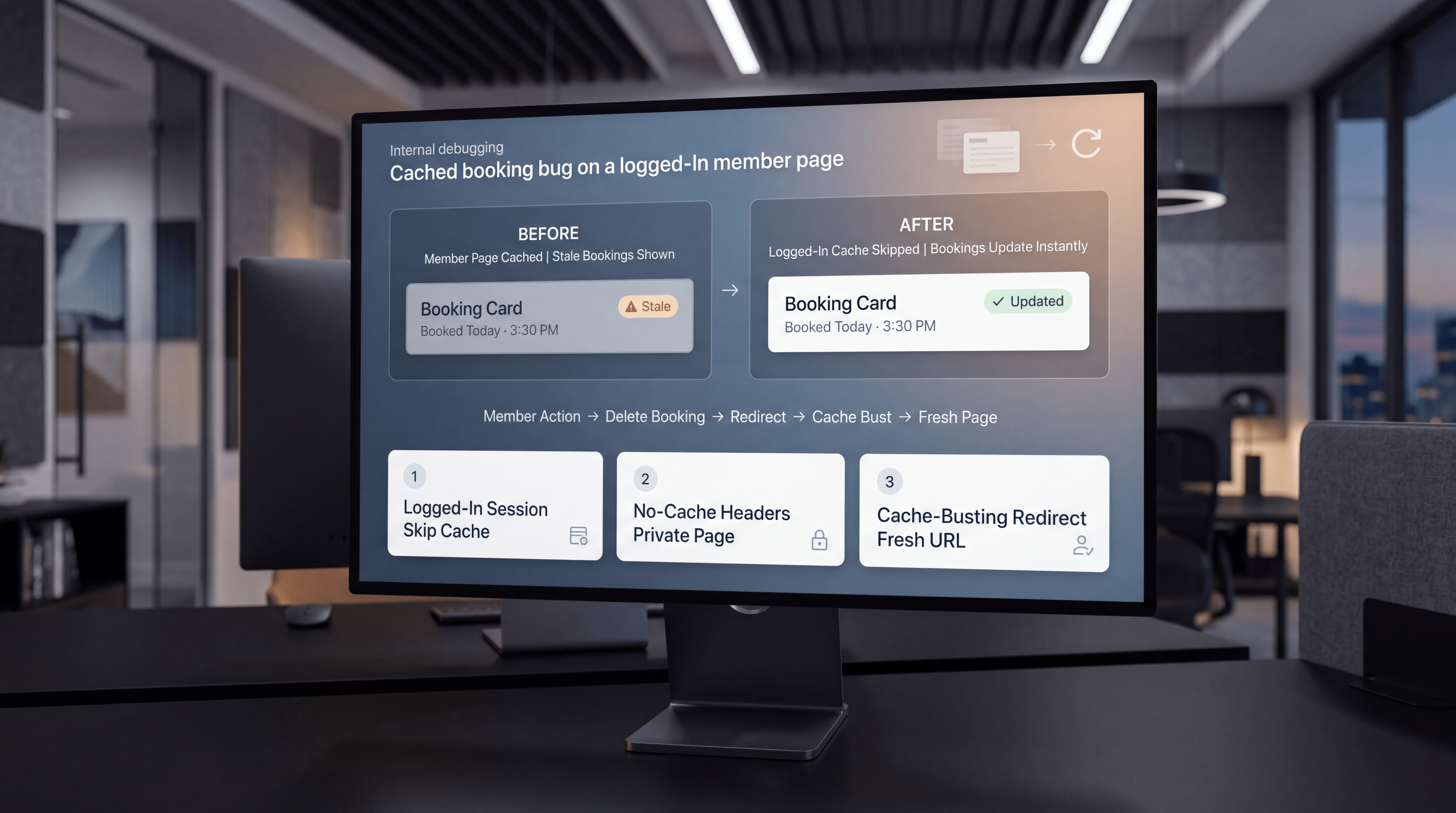
A booking system can look broken even when the database is working perfectly. A member adds or deletes a booking, refreshes the page, and nothing appears to change. The action happened, the data updated, and the application logic ran — but the user still sees the old version of the page.
That kind of bug is frustrating because it feels like a database or PHP problem. In this case, the real issue was cache. The server was treating logged-in members like anonymous guests, caching the private member page, and serving stale HTML after booking changes.
The Problem: Bookings Changed, but the Page Did Not
The visible symptom was simple: members would add or delete a booking, refresh the member page, and see no change. From the user’s perspective, the booking system looked unreliable.
But the backend data was not the problem. The database had the correct state. The issue was that the page being shown to the member was not fresh. It was a cached copy of the old HTML.
This is one of the most common traps in custom member systems: the user-facing page appears broken, but the application is actually serving stale content.
Why Caching Broke the Member Page
Caching is useful for public pages because it improves speed and reduces server load. But private, logged-in, user-specific pages should usually be handled differently.
In this case, the server thought logged-in members were anonymous guests. That meant the /member page could be cached like a public page. After a booking was deleted, the redirect returned to the same URL. Same URL, same cache key, same old page.
The system had updated the booking. The browser simply received stale HTML.
Why This Happens in WordPress/PHP Systems
WordPress and PHP applications often sit behind multiple layers of caching. There may be page cache, object cache, browser cache, server cache, reverse proxy cache, CDN cache, plugin cache, or custom caching logic.
That means a dynamic page can accidentally behave like a static page if the cache layer does not understand that the visitor is logged in.
This is especially important for pages that show:
- Member bookings.
- Private account details.
- Paid access status.
- Custom dashboard content.
- User-specific forms or submissions.
- Booking confirmations or deletions.
These pages should not behave like public marketing pages. They need fresh, user-specific output.
Fix 1: Do Not Cache Logged-In Member Sessions
The first fix was to skip cache when the member session cookie exists. If the system sees a logged-in member cookie, it should not serve a generic cached version of the member page.
The core idea is:
if (!empty($_COOKIE['member_logged_in'])) {
    return; // skip cache
}
This tells the cache logic that logged-in member traffic should be treated differently from anonymous guest traffic.
That distinction matters because member pages are personalized. A cached page that is safe for one user or one moment may be wrong for another user or another action.
Fix 2: Add No-Cache Headers on the Member Page
The second fix was to add no-cache headers to the member page. These headers help tell browsers and intermediary caches not to store or reuse that private page response.
The key pattern was:
nocache_headers();
header('Cache-Control: private, no-store, no-cache, must-revalidate');
This is especially useful for account-style pages where users expect changes to appear immediately after they add, update, or delete information.
The goal is not to disable caching everywhere. The goal is to avoid caching pages where stale content creates a broken user experience.
Fix 3: Bust the Cache After Delete
The third fix was to change the redirect URL after a delete action. If the page redirects back to the exact same URL, the cache can reuse the same cache key and serve the same old HTML.
Adding a timestamp query parameter changes the URL and prevents that stale cache reuse:
wp_safe_redirect( add_query_arg('t', time(), $_SERVER['REQUEST_URI']) );
exit;
This is a practical cache-busting strategy. The user still returns to the member page, but the URL is no longer identical from the cache’s perspective.
Why the Database Was Not the Problem
When a booking interface does not update, it is natural to suspect database writes, delete queries, permissions, or form handling. Those should be checked, but they were not the root cause here.
The important clue was that the system state had changed, but the page output did not reflect it. That points to a presentation or cache layer issue, not necessarily a data persistence issue.
In plain terms: the booking was deleted. The user just could not see the fresh version of the page.
The Bigger Engineering Lesson
Dynamic member pages need cache rules that match their behavior. A public article page and a private booking dashboard should not be cached the same way.
For custom booking systems, the cache strategy should account for:
- Logged-in session cookies.
- User-specific page output.
- Redirect behavior after create, update, or delete actions.
- Browser and proxy cache headers.
- Whether the page can safely be reused across requests.
When those rules are missing, users may think the system is broken even when the backend is functioning correctly.
A Practical Checklist for Booking Page Cache Bugs
If a WordPress/PHP booking page appears stale after updates, use this checklist before rewriting the booking logic:
- Confirm that the database actually updated.
- Check whether the member page is being cached.
- Verify that logged-in member sessions bypass page cache.
- Add no-cache headers to private member pages.
- Change the redirect URL after delete or update actions when needed.
- Test in a fresh browser session and with cache disabled.
- Separate backend data issues from stale HTML issues.
This helps prevent unnecessary rewrites when the real issue is cache behavior.
Why This Matters for Member Experience
Booking systems are trust-sensitive. If a member deletes a booking and still sees it on the page, the system feels unreliable. If a booking is added but does not appear, the user may wonder whether the action worked.
Immediate visual feedback matters. A booking system should make the user feel confident that their action was completed.
That is why cache handling is not just a performance detail. It is part of the user experience.
Software Engineering Support from Changing Crowns®
Changing Crowns® supports custom software, WordPress/PHP development, booking workflows, member systems, cache troubleshooting, and practical digital architecture. A system that “almost works” often needs careful engineering across the database, application logic, server behavior, and user-facing page output.
From custom booking tools to backend debugging, web performance, access systems, and full-stack development, Changing Crowns® helps businesses and founders build digital workflows that are reliable, clear, and thoughtfully executed.
Explore software engineering, web development, and digital strategy support at changingcrowns.com.
Quick Summary
A WordPress/PHP booking system can look broken when member pages are cached incorrectly. In this case, the database was fine, but the server treated logged-in members like guests and served stale HTML. The fix was to bypass cache for logged-in sessions, add no-cache headers on the member page, and bust the cache after delete actions by changing the redirect URL.